
If you get the notification that your YouTube channel has been removed/suspended/terminated, you may be able to recover your channel and/or videos. Before, you get started, remember that YouTube does not appear to have adequate resources to handle the volume of videos, appeals, etc. in a timely manner. Therefore, unless you have a large audience or are famous (and catch the eye of YouTube’s PR team), this process will likely take longer than you are comfortable with.
 STEP 1 – Check to see if your account was hacked

Check to see if your account was hacked. It’s quite possible that your channel was suspended because a hacker posted inappropriate content or spam. YouTube has a new AI Bot to help you recover your account, or you can follow these procedures to recover your account and then contact YouTube’s creator support or @TeamYouTube to see if they can reverse your suspension. They will ask you to DM them and give you instructions on having the appropriate team investigate a potential hack of your account.
If it turns out that your account was not hacked…
STEP 2 – Figure out what happened
Try to figure out what happened. YouTube doesn’t give much information outside of the termination email you received. So dig into the YouTube Community Guidelines to try to figure out what might have happened. In the email notification you receive, there should be a link to appeal your channel suspension. File an appeal an appeal that addresses what may have caused the suspension. Here’s a sample:
| My channel was suspended for ‘encouraging illegal activity.’ I believe this is an error or mistake.
– I know and follow YouTube’s Community Guidelines and policies, and have never received any warnings or strikes I’m trying to determine what triggered the error, and it could have been: |
Your appeal is limited to 1,000 characters, so edit it down and make every word count.
If your channel was large enough to have access to YouTube’s creator support, use it! Although Creator Support won’t be able to override the decisions of Google’s review/moderation team — they can at least make sure your appeal is successfully filed and on the right track.
If your appeal is denied…
STEP 3 – Try to contact @TeamYouTube via Twitter (X)
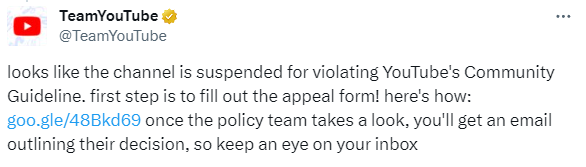 Re-contact @TeamYouTube on Twitter (X). Let them know your appeal was denied and give them some additional reason why your account was suspended in error. As with everything YouTube sends, it’s pretty much a script (so much so that it seems like robots are running the account), although they’ve tried to alter the language a bit recently (we guess it’s to try to prove it’s not robots). Here’s what you might expect from your interaction with @TeamYouTube:
Once your channel is suspended – you should’ve received an email with more info about the reason. If you think this was done in error, you can appeal. Also, here’s more info about account terminations, including why it can happen: https://yt.be/help/WX8p
If you’ve included a link to your channel, you’ll get:
Looks like the channel is suspended for violating YouTube’s Community Guideline. first step is to fill out the appeal form! here’s how: https://goo.gle/48Bkd69 once the policy team takes a look, you’ll get an email outlining their decision, so keep an eye on your inbox
Based on your response, if you tell them your appeal has been denied, you’ll get:
Appeals are carefully reviewed by our team. If you think the suspension was made in error, mind sharing more context on what we might have missed during the process + your channel URL? No promises that the decision will change, but we’ll look into it.
If you tell them you’ve appealed but haven’t heard anything:
We recommend waiting for the decision as it will be emailed to you. You can occasionally check your inbox, spam, and junk folders as our message might get filtered into those places. Keep us posted.
Immediately after sending additional information/context, you’ll get:
Appreciate the info – we’ve gone ahead and passed this along so that we can take a closer look. Thanks for your patience in the meantime.
Depending upon the reason you were removed/suspended/terminated and the information provided, you’ll get one of the following two responses:
Thanks for your patience – we just heard back from our team, and they confirmed that your account was correctly suspended for violating our spam, scam, and deceptive practices policy. Due to this decision, the account will stay suspended. More info here: yt.be/help/BH2P
Update – we heard back from our team and after careful review they have reinstated your channel. We apologize for any inconvenience this may have caused. If you have anymore questions reach back out.
Based on our observations of Twitter (X) traffic, less than 5% of these come back with a channel reinstatement.
 STEP 4 – Try to get your videos back instead of your YouTube channel

At this point, the likelihood of recovering your channel is fading. However, not all is lost. You may be able to require YouTube to provide you access to information you have shared that they hold onto, or force them delete/remove this information. This is important because it seems YouTube maintains copies of videos you have uploaded in order to ensure you do not re-upload them.
Complete Google’s Data Access Request Form and ask them to provide you a copy of your personal information, including your videos. Although, in our experience, this is a painfully slow process, taking them weeks or months to follow up on these forms.
If you are a California resident, the California Consumer Privacy Act (CCPA) requires them to give you a copy of this information. Be sure to mention this on the Data Access Request Form. In order to speed up the process, you might also consider filing a complaint against YouTube on the California Attorney General’s website by completing a Consumer Complaint Against a Business/Company.
While the CCPA in California was the first and seems to be the strongest, other states have developed similar legislation which require companies to provide you with, or remove, the information they hold about you. There are now at least 15 states – California, Virginia, Connecticut, Colorado, Utah, Iowa, Indiana, Tennessee, Oregon, Montana, Texas, Delaware, Florida, New Jersey, and New Hampshire – that have comprehensive data privacy laws in place. Learn more about state privacy laws and check your state laws for more specifics.
If you are a resident of the European Union (EU), the General Data Protection Regulation (GDPR) requires them to give you a copy of this information. Be sure to mention this on the Data Access Request Form. In order to speed up the process, you might also consider contacting the Data Protection Commission.
STEP 5 – Try to get YouTube’s attention
 The previous step may take a couple months based on feedback from those who have done this. However, you may also decide to try to get the attention of YouTube or their public relations team. Here are a few ideas:
- Social Media – If you have a large audience or crowd of supporters, let them know about your challenges with YouTube. If enough people express their support, it will get the attention of YouTube.
- Contact someone at YouTube – YouTube doesn’t seem to consistently enforce its policy or address user concerns. So if you can reach someone who works at YouTube, maybe they can help you get the attention needed to reinstate your channel or videos.
- Contact Advertisers – Thanks to YouTube advertisers, the company raked in over $31 billion last year. There are plenty of other places companies can advertise that aren’t as controversial as YouTube. So let YouTube’s advertisers know of their practices and your dissatisfaction with them. We have provided a list of some of YouTube’s largest advertisers, as well as a sample letter.
- Contact your elected officials – Share with them your experience of being removed from YouTube. Encourage them to reform Section 230 of the 1996 Communications Decency Act to make social media companies more accountable for their censorship. Additionally, encourage them to support legislation similar to the California Privacy Protection Act (CCPA) and California Privacy Rights Act (CPRA) to provide you access to the information you have shared with these companies that they hold onto.’
- Contact your elected officials and encourage your Senator to support Senate Bill 2992, the American Innovation and Choice Online Act, and encourage your Representative to support House Bill 3816, the American Innovation and Choice Online Act. These bills have the potential to make YouTube treat all creators equally, as it should prevent “discriminating in the application or enforcement of the platform’s terms of service among similarly situated users.”
- Contact the media – Share your story with “legitimate” news organizations, podcasts, blogs – wherever you can tell your story. Here’s an example of a Boston Realtor whose appeal was unsuccessful, until the local news station started calling YouTube’s media department.
- File a lawsuit – If you have deep pockets, you can also file a lawsuit against YouTube for censorship and violations of your rights – President Donald Trump sued YouTube for this, and YouTube settled for $24.5 million.
OTHER POTENTIAL TACTICS TO GET YOUTUBE’S ATTENTION
Try Posting on YouTube’s Support Forums. There are a lot of YouTube employees on the forums who have the power to expedite & escalate your appeal. Here’s a sample post on the forums. You can also scroll around and find many cases where it helped.
Using Reddit – https://www.reddit.com/r/youtube/ – While some websites provide advice on going to the YouTube subreddit, our experience is that the moderators of the subreddit are not YouTube employees (at least one is a former employee), and no longer have the ability to reach out to YouTube on your behalf.